
You work hard, keep clients happy, and stay busy all season long, yet somehow your books don’t make sense. You open QuickBooks and wonder:
“Where’s all that profit I thought I made?”
Most pool companies run into the same wall. It’s not that you’re bad with money; it’s that your books aren’t built for your kind of business. Let’s fix that.
Your work isn’t one simple product. You do weekly cleaning, repairs, chemical sales, maybe equipment installs. Each one earns and costs differently.
Yet QuickBooks throws them all into one income bucket. That’s why the standard Profit & Loss report tells you… almost nothing.
To run like a real business, you need to see:
That’s not something QuickBooks does by default, but it’s easy once you know how.
From our experience working with pool business owners, we keep seeing the same top three frustrations.
If that sounds familiar, you’re not alone.
Here’s how successful pool companies fix it.
Forget the cheaper versions. QuickBooks Online Plus is the only one built for pool service operations.
Why Plus matters:
Without Classes, your P&L will always stay flat. With them, QuickBooks becomes a tool for decision-making.
Think of each Class as a “mini-business.” When you tag transactions correctly, you’ll see which part of the business earns best.
Suggested Class setup:
You can also add Tags in QuickBooks for:
Once this structure is in place, your books finally reflect how you operate.
Now that QuickBooks mirrors your business, here are the only reports worth reading.
Shows income and direct costs for cleaning routes.
Reveals which routes or clients are underpriced.
Action: Adjust pricing or rebalance routes where profit margins lag.
Breaks out income from equipment fixes and labor.
Action: Spot which repairs are worth keeping and which just eat time.
Compares cost of chemicals vs. sales price.
Many owners discover they’re selling chemicals at cost.
Action: Set a minimum markup or bundle chemicals into service tiers.
Shows your true operating profit, the one a lender or buyer cares about.
Action: Keep personal items (like chemicals for your own pool) in Add-backs so they don’t confuse your financials.
Tells you which techs and routes bring in the most margin.
Action: Use this data to design bonuses, retrain staff, or reroute jobs.
These 5 reports turn QuickBooks into a management tool, not just a filing cabinet.
Once your QuickBooks is structured around your business, the next challenge is making sure the numbers are trustworthy.
A beautiful setup means nothing if it’s filled with missing or wrong data.
This one insight separates solid books from messy ones.
Every month:
Once everything matches your bank statements, your reports can finally be trusted.
It’s tempting to buy chemicals for your home pool through the business card. Don’t.
Personal spending muddies your numbers and confuses your accountant. Keep dedicated business accounts and cards. If something personal slips in, mark it under Owner Add-backs so it can be removed later.
After your data is clean and reconciled, QuickBooks Online can automate nearly everything.
Set it to email you weekly:
It’s five minutes of review that saves hours of worry.
By now, you understand how to set up QuickBooks so it actually tells your story. But maybe you’re asking yourself:
“Can I do all this in the version I already use?”
Here’s the honest answer: it depends on how you run your business.
Perfect if you want flexibility and automation. You can access it from anywhere, your accountant can log in remotely, and it syncs with pool service software like Skimmer or PoolOps. If your team’s mobile, this version keeps everything connected.
A better fit if you love hands-on estimating or do a lot of equipment installs. You can see cost-per-item right inside estimates, use sales orders, and memorize recurring invoices. But it needs a server, manual backups, and doesn’t connect smoothly to modern tools.
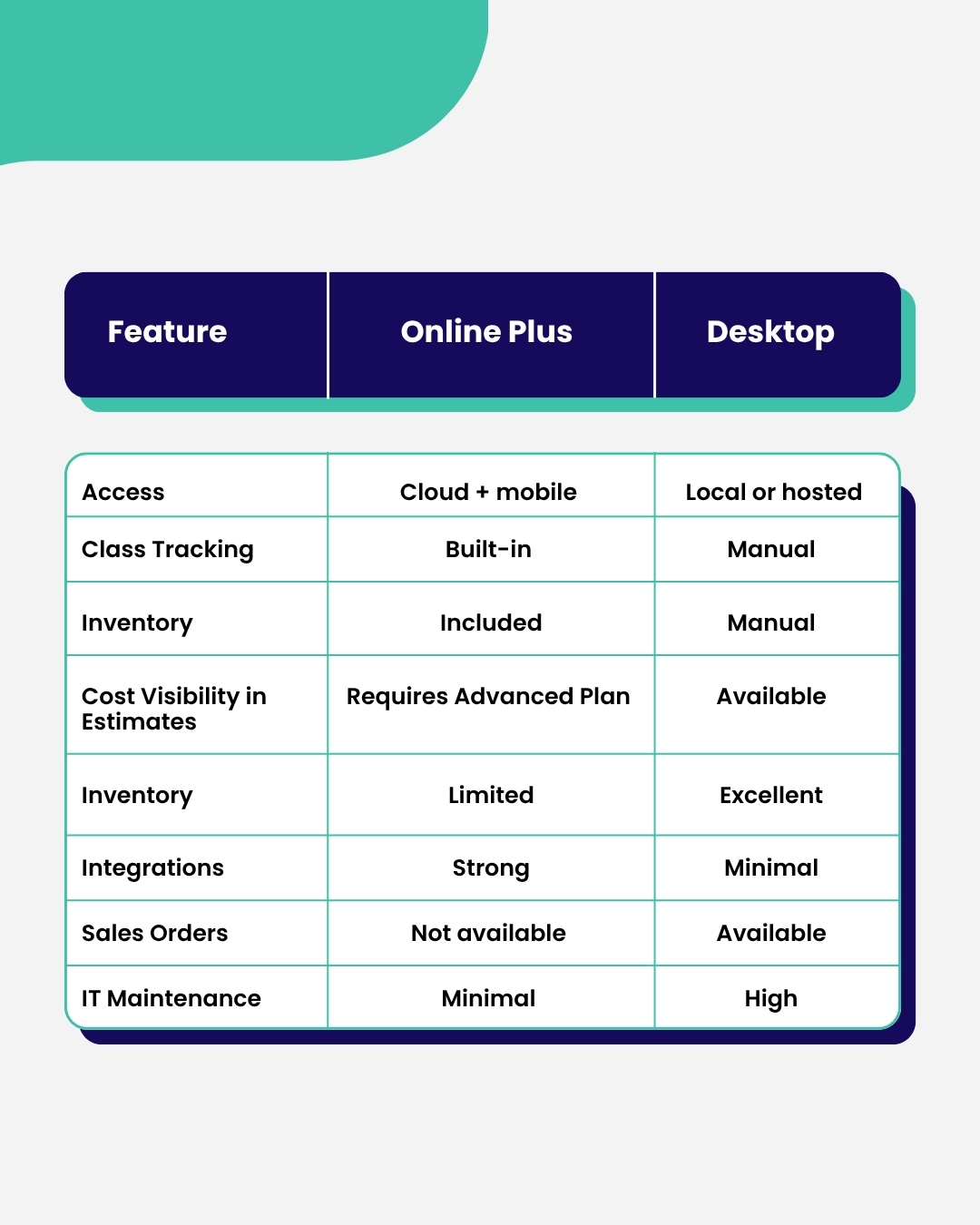
Some owners even keep both, Desktop for estimates, Online for reporting.
At this point, your books are structured, reconciled, and automated. You can finally see where every dollar goes. But there’s a bigger reason this matters, one that goes beyond clean numbers.
When your financials are accurate, they don’t just help you run the business better. They build value in the business itself.
Because someday, maybe next year, maybe ten years from now, you’ll want options: to bring in a partner, refinance, or even sell. And when that day comes, the first thing any buyer or bank looks at is your books.
That’s when you shift from “keeping books” to building value.
And one of the best pieces of advice we’ve ever heard from a fellow pool business owner is this:
“Set up your QuickBooks as if a buyer will look at it tomorrow.”
Not because you’re planning to sell. But because thinking that way changes how you run the business today. When you maintain your books like someone else might evaluate them:
Even if you never sell, this mindset pays off. It forces discipline. It builds confidence. And it makes every decision from hiring to pricing: clearer, faster, and smarter.
Once your reporting is clean, use it to make decisions the way a CFO would.
This is where clean bookkeeping becomes a profit strategy.
Overbuilding is a silent killer. Too many chart-of-accounts lines slow down reports and confuse everyone. Keep your COA lean, let Classes and Tags handle the segmentation.
Rule of thumb:
The hardest part of bookkeeping for any pool company isn’t QuickBooks, it’s keeping up with what’s happening out there. Your techs are replacing parts, adding chemicals, and completing dozens of jobs a week. If that information doesn’t make it into QuickBooks right away, your numbers drift from reality. That’s where your field tools come in.
Apps like Skimmer, PoolOps, or PaySimple already track what happens at each pool: who worked, what was used, and what was billed. When you integrate those tools with QuickBooks, every job detail flows straight into your books.
Here’s why this matters:
Desktop owners: one hidden gem worth noting
If you still use Desktop, one killer feature remains unmatched: You can see item cost right inside the estimate.
For heavy repair or construction work, that’s gold. You can quote jobs while seeing your exact margin without jumping between screens. So if major repairs or builds are your bread and butter, you might keep Desktop for estimates, but still use Online for everything else.
When your books are clean, closing the year is easy:
You’ll never scramble again in March. And if an investor or buyer ever knocks, your numbers will already tell a confident story.
✅ Upgrade to QuickBooks Online Plus
✅ Create core Classes and Tags
✅ Keep Chart of Accounts lean
✅ Reconcile monthly
✅ Fix all “Not Specified” transactions
✅ Separate personal expenses under Owner Add-backs
✅ Automate weekly reports
✅ Track chemical margin monthly
✅ Integrate field apps for data sync
You didn’t start a pool business to stare at spreadsheets. But if your numbers aren’t clear, every decision feels like a guess...
Should you hire? Raise prices? Add a truck? Drop a client?
When your books are built right, those answers are obvious. You see which jobs drive profit, where cash goes, and how to grow without chaos.
That’s the power of clean, structured bookkeeping.
At Little Financial, we help pool service businesses turn QuickBooks into a real management system. We set up Classes, fix messy data, build your reports, and automate the insights you need to run smarter.
Book a consultation. We’ll help you see your numbers clearly and keep more of what you earn.




.avif)